Product list
In the product list, you can view the list of products registered in Kuroco.
Accessing the screen
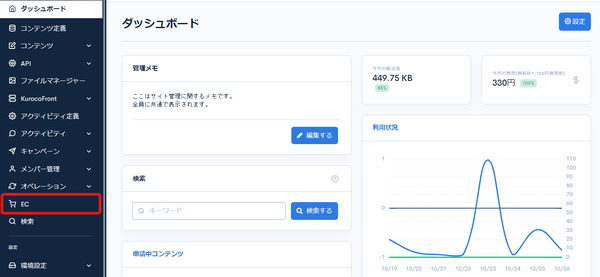
Click [EC].
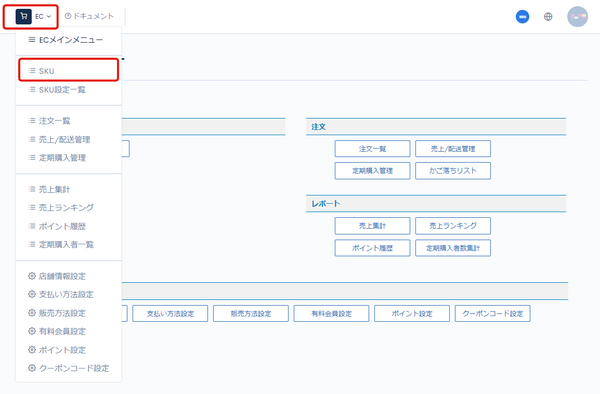
 In the E-commerce main menu, click [EC], and then click [SKU] in the dropdown.
Field descriptions
| Field | Description |
|---|---|
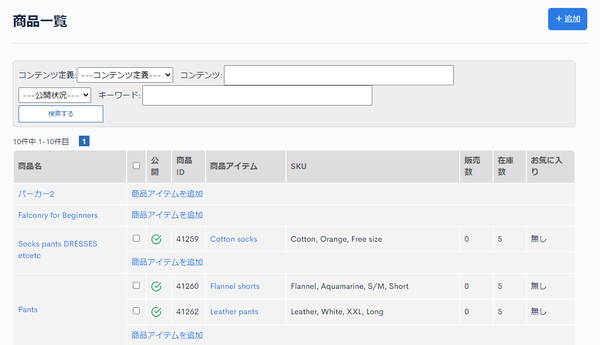
| Search | Search for products by setting conditions. |
| Product name | Displays the product name. Click it to go to the product content. |
| Published | Shows the publication status. : Published : Published : Unpublished : Unpublished |
| Product ID | Displays the product ID. The ID is assigned automatically. |
| Add product item | Click to go to the product specification SKU settings page for the SKU to add. |
| Product item | Displays the product name. Click it to go to the SKU edit page. |
| SKU | Displays the specifications of the SKU. |
| Number of sales | Displays the number of sales. |
| Stock | Displays the stock quantity. |
| Favorite | Displays the number of times the product has been added to favorites. |
Batch actions
Check the checkboxes next to the publication status and click [Publish], [Unpublish], or [Delete] to apply the action to the selected products at once.
Related documents
Support
If you have any other questions, please contact us or check out Our Slack Community.