Regular purchase member list
In the regular purchase member list, you can view the users who currently have recurring purchases and their purchase status.
Accessing the screen
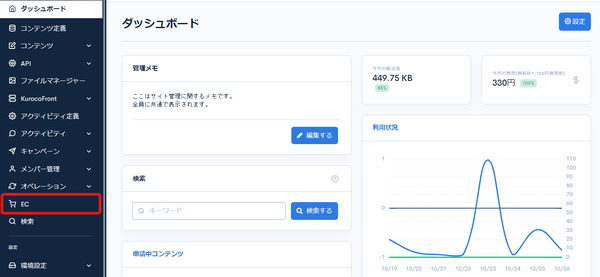
Click [EC].
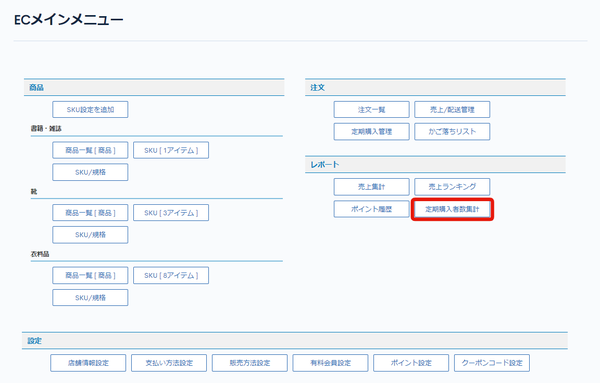
 In the E-commerce main menu, click [Total recurring customers].
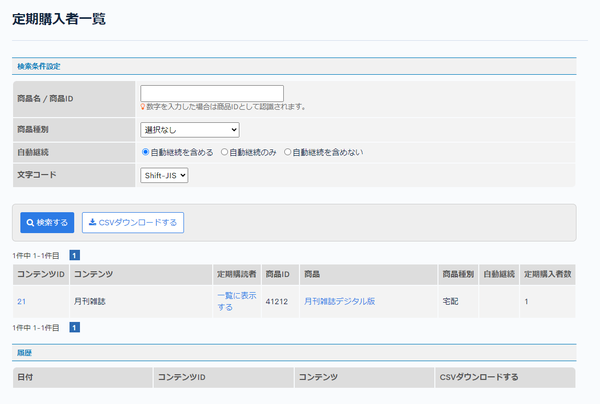
 The regular purchase member list page is displayed.
Field descriptions
Search criteria
| Field | Description |
|---|---|
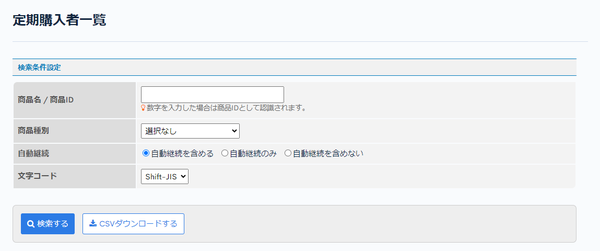
| Product name/Product ID | Enter the product name or product ID. |
| Product type | Select the product type. |
| Automatic renewal | Select the condition for automatic renewal. |
| Charset | Select the character encoding. |
| Search | Searches recurring customers with the configured conditions. |
| CSV download | Downloads the list of recurring customers as a CSV file with the configured conditions. |
List

| Field | Description |
|---|---|
| Content ID | Displays the content ID of the product. |
| Content | Displays the content subject of the product. |
| Subscriber | Click "List view" to go to Regular purchase management. |
| Product ID | Displays the product ID. |
| Product | Displays the product name (SKU subject). |
| Product type | Displays the product type. |
| Automatic renewal | Displays whether the product is automatically renewed. |
| Subscriber count | Displays the number of users purchasing the product on a recurring basis. |
Related documents
Support
If you have any other questions, please contact us or check out Our Slack Community.