Regular purchase management
In Regular purchase management, you can view the list of recurring customers and edit the number of shipments of products purchased on a recurring basis.
Accessing the screen
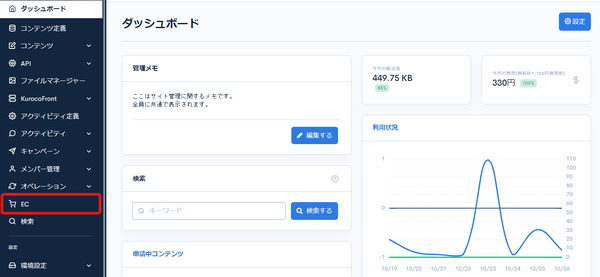
Click [EC].
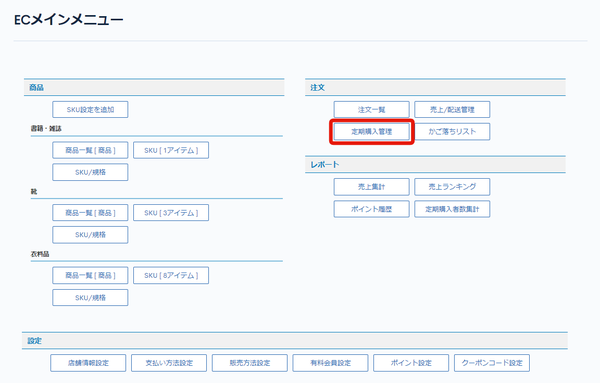
 In the E-commerce main menu, click [Regular purchase management].
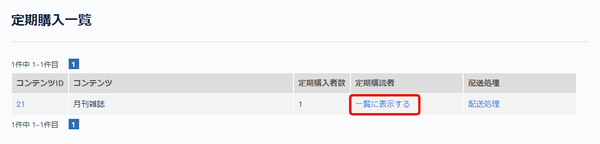
 On the regular purchase list page, click [Display in the list] for the content you want to update.
Field descriptions
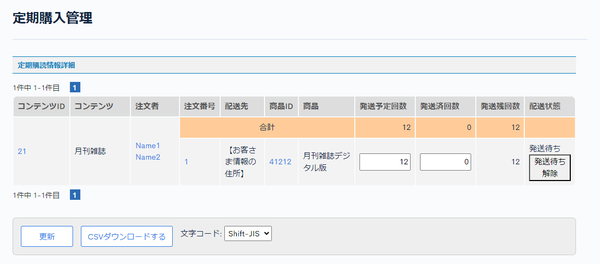
Subscription details
| Field | Description |
|---|---|
| Content ID | Displays the content ID of the recurring product. |
| Content | Displays the title of the recurring product. |
| Orderer | Displays the orderer of the product. |
| Order ID | Displays the order ID. |
| Delivery address | Displays the delivery address. |
| Product ID | Displays the product ID. |
| Product | Displays the title of the product. |
| Sending limit times | Displays the planned number of shipments. |
| Sending times | Displays the number of shipments. |
| Sending rest times | Displays the remaining number of shipments. |
| Delivery status | Displays the delivery status. Click the [Start delivery] or [Release delivery waiting] button to update the delivery status. Products whose delivery status is waiting for delivery are displayed on the Delivery processing page. |
Buttons
| Field | Description |
|---|---|
| Update | Applies the values entered for the planned number of shipments and the number of completed shipments. |
| CSV download | Downloads the list of recurring purchases as a CSV file. You can select "Shift-JIS" or "UTF-8" from "Charset". |
Related documents
Support
If you have any other questions, please contact us or check out Our Slack Community.