Vector Data
In Vector Data, you can enable AI functionality and check the status of batch processing for vectorizing content.
How to Check Vector Data
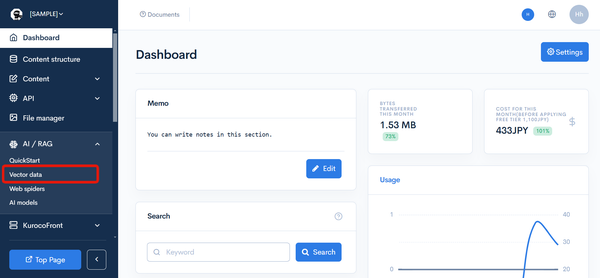
Click [AI] -> [Vector Data].
Description of Vector Data Items
Vector Data
| Item | Description |
|---|---|
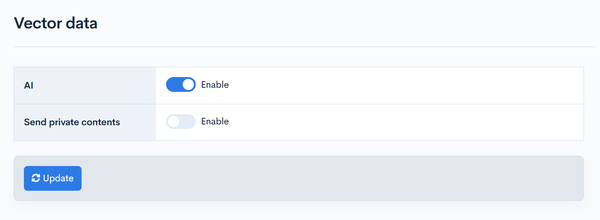
| AI | Checking this enables the use of an API to generate responses by AI. |
| Send private contents | Check this if you want to allow the use of private content by AI. |
| API key | You can also set your own API key. If not set, Kuroco's API key will be used. If a key is already set, you can delete it by checking [Delete] and updating. |
| Update | Clicking [Update] will apply the settings. |
Batch Processing
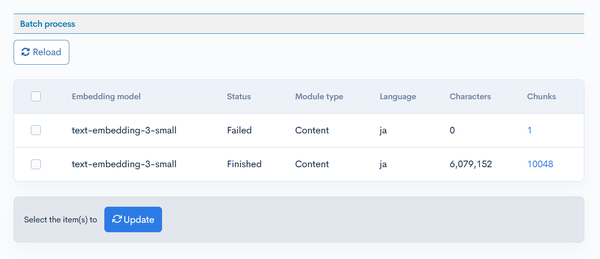
If there are content definitions with [Convert to Vector Data] enabled, you can check the batch processing results for vectorizing the data.
| Item | Description |
|---|---|
| Embedding model | Displays the embedding model used. |
| Status | Displays the status of the batch processing. |
| Module type | Displays the module that has been vectorized. |
| Language | Displays the language of the vectorized content. |
| Characters | Displays the character count of the vectorized content. |
| Chunks | Displays the number of content pieces that have been vectorized. Clicking the link allows for detailed checking. |
| Update | Check the checkbox on the left side of the table and click to rerun the batch processing for vectorizing the data. |
Vector data list
Clicking a [Chunks] link in the batch processing table shows the list of vectorized content.
You can search by keyword and embedding model. Entering a keyword and clicking [Search] displays similar content found by vector search.
| Item | Description |
|---|---|
| Title | Displays the content title. Clicking the link opens the content editing screen. |
| Module (Content) ID | Displays the ID of the vectorized content. |
| Module type | Displays the module that has been vectorized. |
| Language | Displays the language of the vectorized content. |
| Slug | Displays the content slug. |
| Embedding model | Displays the embedding model used. |
| Characters | Displays the character count of the vectorized content. |
| Index | Displays the chunk index. |
| Vector distance | Displays the vector distance from the search keyword when a keyword search is performed. |
| Status | Displays the status of the batch processing. |
| Update | Check the checkboxes on the left side of the table and click [Update] to rerun the batch processing for the selected vector data. |
Related Documents
Support
If you have any other questions, please contact us or check out Our Slack Community.