Auto-login with cookie and dynamic access token authentication
Overview
Auto-login restores a user's login state without requiring them to re-enter their email address or password after the normal login state expires.
The implementation differs depending on the Kuroco API security setting.
| Item | Dynamic Access Token | Cookie |
|---|---|---|
| Stored data | The application retains the access token and refresh token returned by Login::token. | The browser retains a login session cookie and an auto-login cookie. |
| Authentication request | Specify the access token in the X-RCMS-API-ACCESS-TOKEN request header. | Specify credentials: "include" to send cookies from the browser. |
| Normal login state | The access token can be used for the period configured in access_token_lifespan. | The login session cookie is used for the current login session. |
| Auto-login | Send the refresh token from the frontend to Login::token to obtain a new access token. | Kuroco restores the login state when the browser sends the auto-login cookie. |
| Auto-login validity period | Set refresh_token_lifespan in seconds. | Set Auto login validity period in days under [Environment] -> [Admin panel] -> [Admin panel]. |
| Validity period renewal | Reissuing an access token does not renew the refresh token validity period. | Restoring the login state does not renew the auto-login validity period. |
| Browser restrictions | Cookies are not used for auto-login. | Cookie deletion, third-party cookie restrictions, and Safari restrictions can affect auto-login. |
Dynamic access token authentication
With dynamic access token authentication, the frontend retains the access token and refresh token. When the access token expires, use a valid refresh token to obtain a new access token.
Configure the endpoints
Set the API security to Dynamic Access Token.
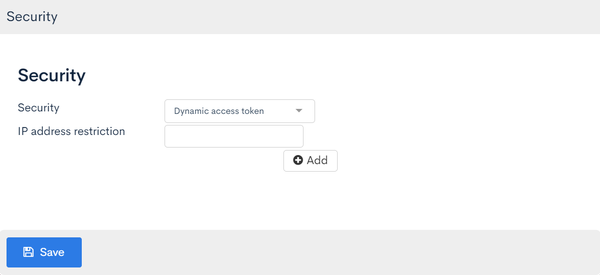
Create a login endpoint and a token endpoint.
Login endpoint
| Field | Setting |
|---|---|
| Path | login |
| Category | Authentication |
| Model | Login(v1) |
| Operation | login_challenge |
Token endpoint
| Field | Setting |
|---|---|
| Path | token |
| Category | Authentication |
| Model | Login(v1) |
| Operation | token |
| use_refresh_token | Checked |
| access_token_lifespan | Access token validity period in seconds |
| refresh_token_lifespan | Refresh token validity period in seconds |
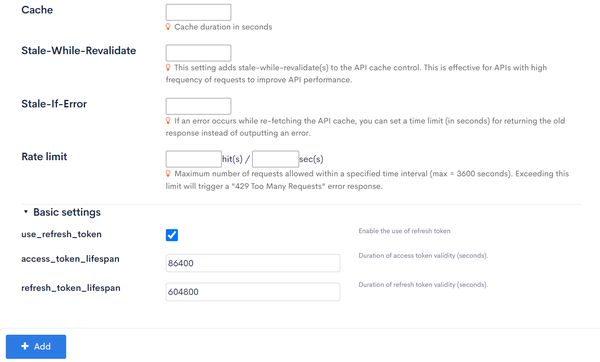
Obtain an access token and refresh token
Send the login credentials to Login::login_challenge.
With dynamic access token authentication, a refresh token can be obtained while keeping login_save set to 0. When use_refresh_token is enabled for Login::token, a refresh token is issued when the grant_token is exchanged. login_save: 1 is required only when issuing an auto-login cookie for cookie authentication.
{
  "email": "member@example.com",
  "password": "PASSWORD",
  "login_save": 0
}
The response contains a grant_token.
{
  "grant_token": "GRANT_TOKEN",
  "status": 0,
  "member_id": 123,
  "info": {
    "validUntil": 1700000000
  },
  "messages": [],
  "errors": []
}
Send the grant_token from the response to Login::token.
{
  "grant_token": "GRANT_TOKEN"
}
When use_refresh_token is enabled for Login::token, the response contains an access token and a refresh token.
{
  "access_token": {
    "value": "ACCESS_TOKEN",
    "expiresAt": 1700000000
  },
  "refresh_token": {
    "value": "REFRESH_TOKEN",
    "expiresAt": 1700604800
  }
}
To access an API that requires authentication, specify the access token in the X-RCMS-API-ACCESS-TOKEN request header.
Auto-login with dynamic access token authentication uses the refresh token returned by Login::token.
Reissue an access token using a refresh token
When the access token expires, send the refresh token to Login::token.
{
  "grant_token": "",
  "refresh_token": "REFRESH_TOKEN"
}
A new access token is returned.
{
  "access_token": {
    "value": "NEW_ACCESS_TOKEN",
    "expiresAt": 1700100000
  }
}
Reissuing an access token with a refresh token does not return a new refresh token. Use the initially issued refresh token until its expiresAt. When the refresh token expires, the user must log in again starting from Login::login_challenge.
With dynamic access token authentication, Kuroco does not automatically restore the browser's login state. The frontend must retain the tokens and implement access token reissuance when the access token expires.
Access tokens and refresh tokens are authentication credentials. Design how they are stored, and do not output them to logs or public files.
Cookie authentication
With cookie authentication, specify 1 for login_save in Login::login_challenge to enable auto-login. No endpoint post-processing or additional Post-login processing is required.
Configure the API and validity period
Set the API security to Cookie.
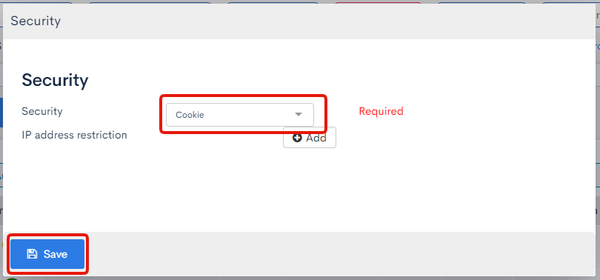
Create a login endpoint.
| Field | Setting |
|---|---|
| Path | login |
| Category | Authentication |
| Model | Login(v1) |
| Operation | login_challenge |
Next, click [Environment] -> [Admin panel] -> [Admin panel], enter the number of days in Auto login validity period, and click Update. This setting applies to the auto-login validity period for both the admin panel and the API.
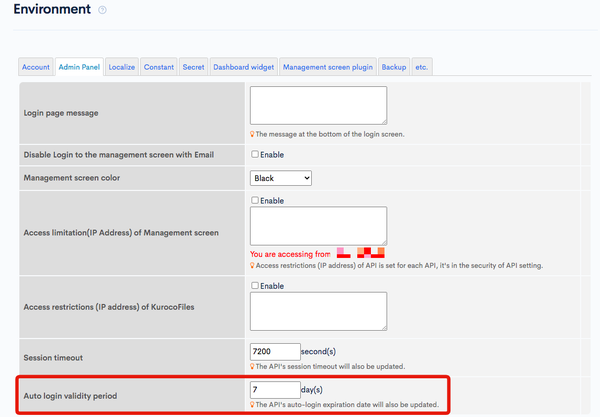
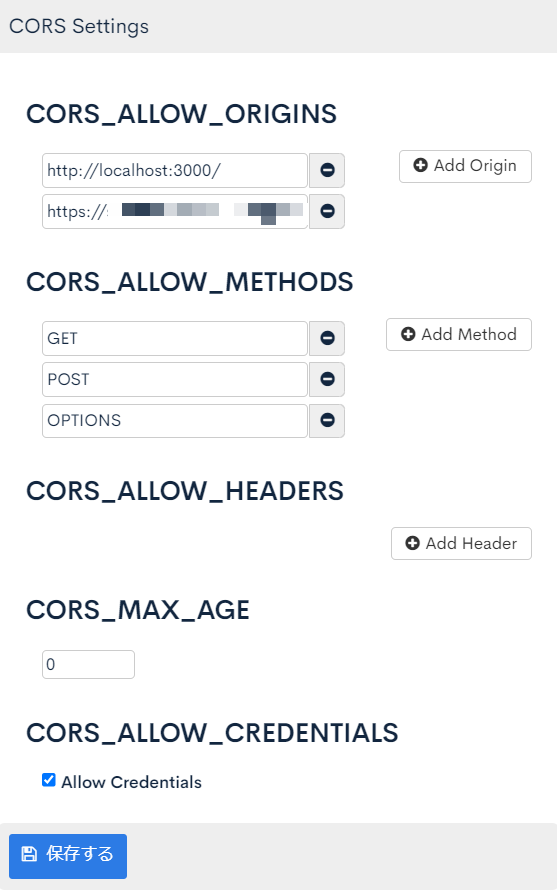
When accessing the API from a browser, configure CORS as follows and click Save.
- Add the frontend origin to
CORS_ALLOW_ORIGINS. - Add
GET,POST, andOPTIONStoCORS_ALLOW_METHODS. - Enable Allow Credentials in
CORS_ALLOW_CREDENTIALS.
To avoid third-party cookie restrictions, align the frontend and Kuroco domains, such as www.example.com and api.example.com.
Cookie authentication requires CORS_ALLOW_CREDENTIALS, so do not specify * in CORS_ALLOW_ORIGINS.
With *, the origin of the request is allowed as-is, which means every origin is allowed to send requests with cookies and to read the responses.
Specify the frontend origin explicitly.
Log in with login_save
Specify 0 or 1 for login_save.
| Value | Behavior |
|---|---|
0 | Starts a normal login session. The user must log in again after the session expires. |
1 | Issues an auto-login token in addition to starting a normal login session. |
const response = await fetch(
  "https://api.example.com/rcms-api/1/login",
  {
    method: "POST",
    headers: {
      "Content-Type": "application/json",
    },
    credentials: "include",
    body: JSON.stringify({
      email: "member@example.com",
      password: "PASSWORD",
      login_save: 1,
    }),
  }
);
Also specify credentials: "include" when accessing an API that requires cookie authentication after login.
const profile = await fetch(
  "https://api.example.com/rcms-api/1/profile",
  {
    credentials: "include",
  }
);
Logging in with login_save: 1 stores an auto-login cookie in addition to the cookie for the normal login session.
| Cookie | Purpose |
|---|---|
rcms_api_access_token | Used for the current login session. |
rcms_api_refresh_token | Used to restore the login state when the normal login session expires. |
Depending on the environment, the cookie names may have a __Host- prefix. The frontend does not handle the cookie values directly and specifies credentials: "include" to leave their transmission to the browser.
You can view issued auto-login tokens under [Member] -> [Member] -> [Auto login tokens]. To invalidate a token, select it in the list and click Delete. A deleted token cannot restore the login state.
Verify auto-login with cookie authentication
Verify the following:
- Open the login request in the browser developer tools and inspect
Set-Cookiein the response. - Under Application or Storage in the browser developer tools, check the login session cookie and auto-login cookie.
- Under Auto login tokens, check the auto-login token for the member.
- After the normal login session expires, access an API that requires authentication with
credentials: "include"and verify that the login state is restored.
Validity periods and notes
- The auto-login validity period for cookie authentication is calculated from the time the user logs in with
login_save: 1. Restoring the login state through auto-login does not extend the validity period. - A refresh token for dynamic access token authentication remains valid until the
expiresAtvalue set when it was first issued. Reissuing an access token does not issue a new refresh token. - With cookie authentication, browser cookie deletion and third-party cookie restrictions can cause the login state to be lost before the period configured in Kuroco.
- If a session longer than seven days is required in Safari, use dynamic access token authentication instead of cookie authentication.
Related documents
Support
If you have any other questions, please contact us or check out Our Slack Community.