OAuth Authorization Server
The OAuth Authorization Server screen lets you configure Kuroco to act as an OAuth 2.0 / OpenID Connect authorization server. You can issue authorization codes and access tokens to external OAuth clients (including MCP clients). Each OAuth Authorization Server setting can have multiple OAuth Authorization Server clients registered under it.
OAuth Authorization Server list
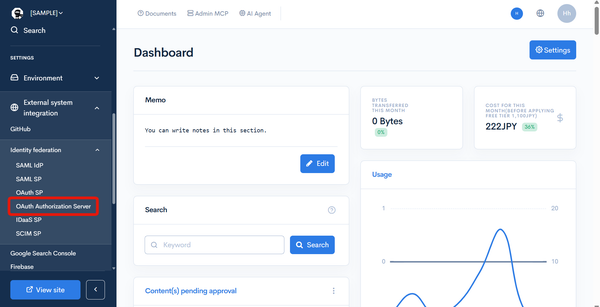
Accessing the screen
In the left sidebar menu, under "SETTINGS", click [External system integration] -> [Identity federation] -> [OAuth Authorization Server].
Field descriptions
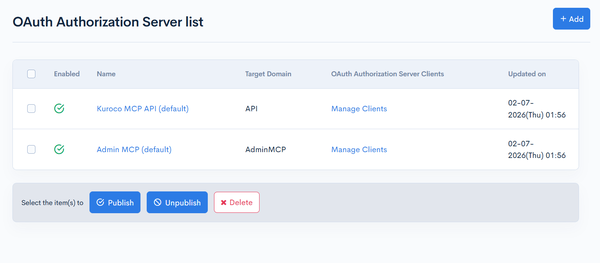
| Field | Description |
|---|---|
| Enabled | Status of the OAuth Authorization Server. : Enabled : Enabled : Disabled : Disabled |
| Name | Name of the OAuth Authorization Server. Click it to open the editor. |
| Target Domain | The target domain (purpose) of this authorization server: one of API / Management / AdminMCP. |
| OAuth Authorization Server Client | Click [Manage Clients] to open the list of clients bound to this authorization server. |
| Updated on | Date and time of the last update. |
On the list screen, you can enable, disable, or delete the authorization servers selected with the checkboxes in bulk.
OAuth Authorization Server editor
Accessing the screen
In the left sidebar menu, under "SETTINGS", click [External system integration] -> [OAuth Authorization Server]. To create a new authorization server, click [Add] at the top right of the list screen. To edit an existing setting, click the [Name] of the authorization server you want to edit on the list screen.
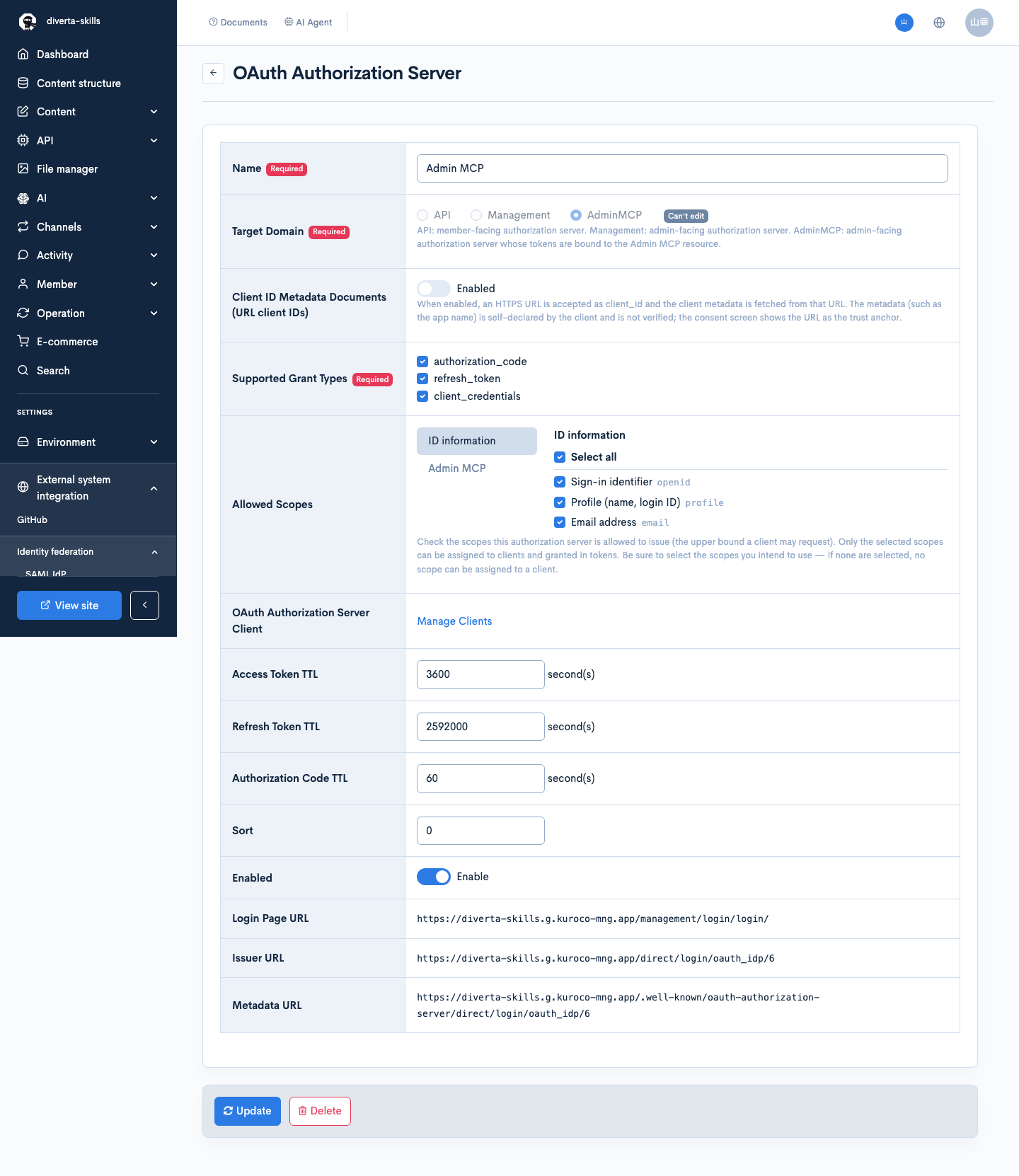
Item descriptions
Setting items
| Item | Description |
|---|---|
| Name | Name of the OAuth Authorization Server. (Required) |
| Target Domain | Purpose of this authorization server.API: member-facing authorization server.Management: admin-facing authorization server.AdminMCP: admin-facing authorization server whose tokens are bound to the Admin MCP resource.(Required) Note: The target domain cannot be changed after creation. The editor shows a [Can't edit] badge. Changing it would desync the stored allowed scopes, grant types, and resource binding. |
| Client ID Metadata Documents (CIMD) | When enabled, an HTTPS URL is accepted as client_id and the client metadata is fetched from that URL. The metadata (such as the app name) is self-declared by the client and is not verified; the consent screen shows the URL as the trust anchor. For details, see Client ID Metadata Documents (CIMD). |
| Supported Grant Types | Check the OAuth grant types this authorization server supports (at least one required).authorization_code: authorization code flow.refresh_token: reissue via refresh token.client_credentials: token issuance via client credentials.By default, authorization_code and refresh_token are selected. |
| Groups allowed to sign in | Restricts, by group membership, the members who can sign in (authorize on the consent screen) through this authorization server. You can select multiple groups; only members who belong to at least one of the selected groups can sign in. Renewing (refresh_token) and using already-issued tokens is restricted the same way, so a token stops working as soon as the member leaves the allowed groups.Leave it empty for no restriction. Existing conditions such as login permission and, for the Admin MCP server, eligibility to use the admin panel still apply regardless of this setting. The available choices depend on the target domain: API lists all enabled groups (including member groups); Management / AdminMCP list only the groups that can use the admin panel (login user groups are not shown).Newly created Management / AdminMCP authorization servers start with the "Super user" group selected. Existing authorization servers and API authorization servers start empty (no restriction).This setting does not apply to client_credentials or to service tokens issued from the admin panel or agent settings (deploy tokens, agent tokens, MCP checker); the member acting as the subject of a service token is specified individually by the administrator.When a member outside the allowed groups requests authorization, the error is access_denied; when renewing or using an issued token, the error is invalid_grant (error_description: The member is not in a group permitted to sign in through this authorization server.).If the saved allowed groups include a group that is no longer available (for example, a disabled or deleted group) or an invalid value, the edit screen shows a warning. Review the selection and check [Replace unavailable groups or invalid values with the current selection (no selection means no restriction).] before saving. |
| Allowed Scopes | Check the scopes this authorization server is allowed to issue (the upper bound a client may request). Only the selected scopes can be assigned to clients and granted in tokens. Be sure to select the scopes you intend to use — if none are selected, no scope can be assigned to a client. The available scopes depend on the target domain (see Scope list). |
| OAuth Authorization Server Client | Click [Manage Clients] to open the list of clients bound to this authorization server. (Shown only for saved authorization servers.) |
| Issued authorizations | Click [List and revoke issued authorizations] to open the list of access / refresh tokens issued by this authorization server. See Issued authorizations for details. (Shown only for saved authorization servers.) |
| API endpoint | Lists the API endpoints whose MCP server is bound to this authorization server. Click an API to open its editor. (Shown only for a saved authorization server with target domain API.) |
| Access Token TTL | Lifetime of the access token, in seconds (minimum 60). Default is 3600 seconds. |
| Refresh Token TTL | Lifetime of the refresh token, in seconds (minimum 60). Default is 2592000 seconds. |
| Authorization Code TTL | Lifetime of the authorization code, in seconds (minimum 10). Default is 60 seconds. |
| Sort | Display order in the list, as a number. |
| Enabled | Check to enable this setting. |
| Login Page URL | For target domain API, the path or URL of the login page used for sign-in (e.g. /login/). (Optional)When left empty, the login page served by the authorization server itself is used. For a saved authorization server, the URL of the served login page is shown below the input field. See Login page served by the authorization server for details. When a value is set, sign-in happens on that page and returns to the authorization server, as before. For Management / AdminMCP, this field is hidden and the admin panel login URL is used automatically. |
| Issuer URL | Issuer URL of this authorization server (read-only). Shown only for saved authorization servers. |
| Metadata URL | URL of this authorization server's metadata (Authorization Server Metadata) (read-only). Shown only for saved authorization servers. |
Actions
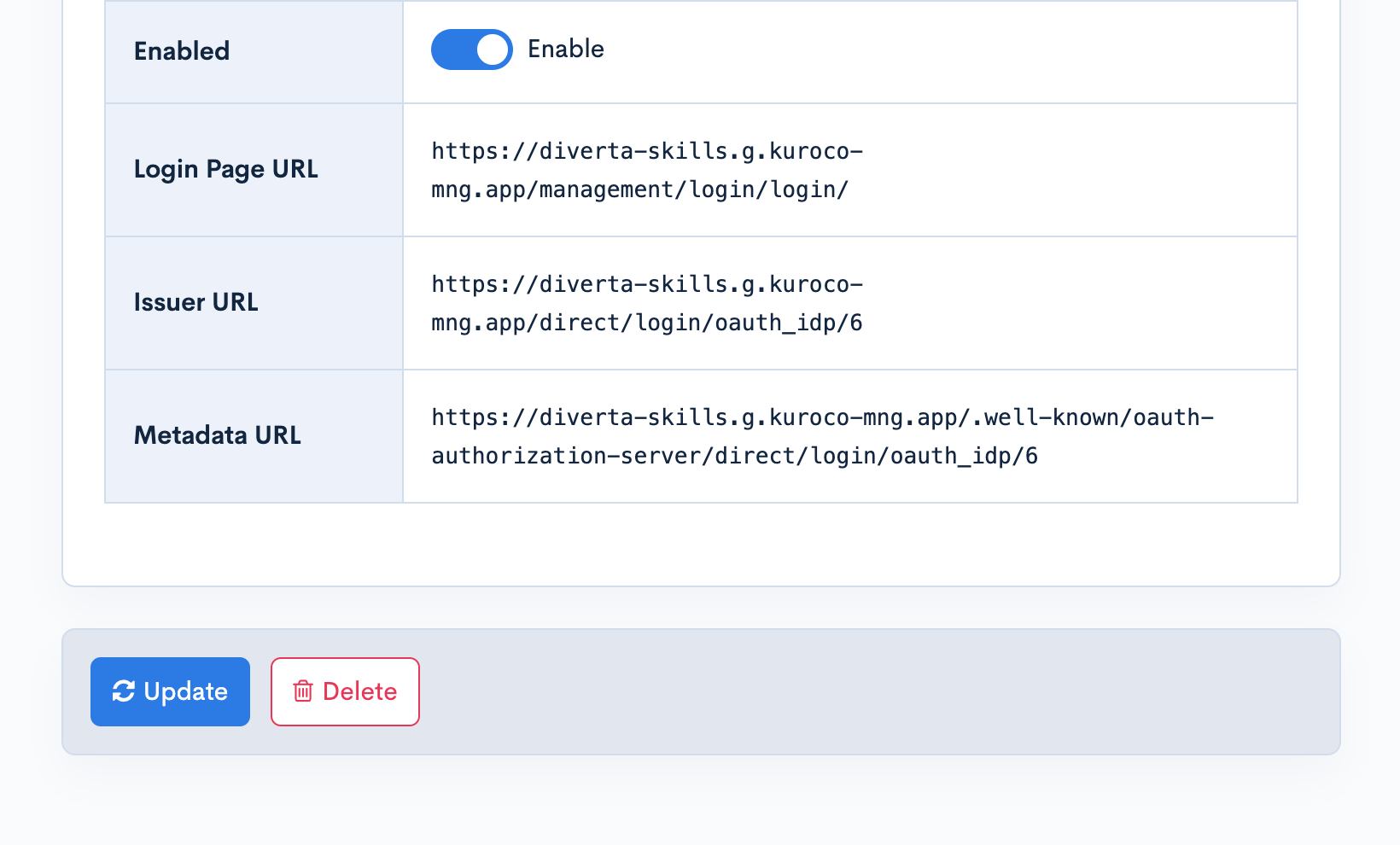
| Button | Description |
|---|---|
| Update | Save the entered content. |
| Delete | Delete the OAuth Authorization Server setting shown. |
Scope list
The scopes available under "Allowed Scopes" depend on the target domain.
| Target Domain | Available scopes |
|---|---|
API | Sign-in scopes (openid / profile / email), plus API read access (api:read) and API write access (api:write) |
Management | Sign-in scopes only (openid / profile / email) |
AdminMCP | Sign-in scopes, plus the Admin MCP capability level |
Admin MCP capability levels
When the target domain is AdminMCP, select one Admin MCP capability level from the following.
| Capability level | Scope | Description |
|---|---|---|
| Read-only | mcp:tools.read | Can use read tools. |
| Read & write | mcp:tools.read + mcp:tools.write | Can use read and write tools. The ceiling of what this level may do is defined by Kuroco and can be reviewed under Permissions delegated by mcp:tools.write on the Admin MCP screen. |
| All operations (delegated account permissions) | mcp:tools.all | Delegates every operation, bounded by the permissions of the account the token acts as. Creating, updating, or deleting groups (permissions) and generic Smarty batches, reconfiguring an OAuth Authorization Server or revoking the authorizations it issued, granting the super-user group to a member, generating a privileged static token, changing the access restrictions (IP addresses), and changing the trigger settings of custom functions are excluded. Any member can approve this level. |
| Full access | mcp:admin | Includes all operations such as token generation, and bypasses content/module restrictions. Only a super user can approve this level. Any other member is offered the widest level they can grant on the consent screen, and the token is issued at that level. |
At every capability level, a token's effective permission is the intersection of the authenticated member's own permission and the ceiling of that level, so a token never gains a permission the member lacks.
mcp:tools.list, which is required to list tools, is granted automatically on save at every capability level.
Which modules and content a token can operate on is not determined by scopes but by the client's Target resource (the Admin MCP endpoint URL). For the endpoint URL format, see MCP server reference.
When sign-in scopes (openid / profile / email) are granted, this authorization server acts as an OpenID Connect authorization server and releases the member's sign-in information (claims) to the client. id_token issuance and claim retrieval from the userinfo endpoint are enabled only when the granted scope contains openid. For details on id_token, the userinfo endpoint, the JWKS endpoint, and more, see OpenID Connect support for OAuth Authorization Server.
Only one authorization server with target domain Management and one with AdminMCP can be enabled site-wide at a time, because each resource server resolves exactly one enabled setting. (API may have several, since each MCP-enabled API binds to one authorization server individually.)
Login page served by the authorization server

When [Login Page URL] is left empty on an authorization server with target domain API, the authorization server serves the login page itself. If a member who requests authorization (for example from an MCP client) is not signed in, they are taken to the login page at the following URL and proceed to the authorization (consent) screen after signing in.
https://<API domain>/direct/login/oauth_idp/{authorization server ID}/login
This URL is shown below [Login Page URL] in the editor of a saved authorization server. Members can complete the sign-in required to connect from an MCP client without you preparing a custom login page.
This login page is shown in the middle of an authorization flow started from an MCP client or similar. If you open the URL directly in a browser, "The authorization request could not be processed" is shown because the authorization request information (Return_URL) is missing. To see the page, start the authorization flow from an MCP client.
Sign-in methods available on the login page
| Sign-in method | Description |
|---|---|
| Email address (login ID) and password | If [Do not use email address for admin panel login] is enabled in the site settings, this form is not shown. |
| Two-factor authentication | If a one-time password or a passkey is used as the second factor, the input step is shown after password authentication. |
| Sign in with an external account | If enabled OAuth SP / SAML SP / IDaaS SP settings with target domain API exist, a sign-in button is shown for each of them. After authenticating with the external account, the member returns to the authorization (consent) screen. The buttons are hidden while two-factor input is pending. |
The served login page does not show the language switcher, passwordless passkey sign-in, or [Sign in automatically next time] that are available on the admin panel login screen.
Initial value and existing authorization servers
- For newly created authorization servers with target domain
API, and for the "Kuroco MCP API (default)" server created automatically when MCP is enabled on an API, [Login Page URL] is empty (served login page) by default. - Existing authorization servers whose [Login Page URL] was set to the admin panel login URL (
.../management/login/login/) are switched to empty (served login page) automatically on update. Servers set to any other URL are left unchanged. - To switch an existing authorization server to the served login page, clear [Login Page URL] in the editor and click [Update]. When switching through the Admin MCP tool
oauth_server-update, send an explicit empty string ("") forlogin_page. Omittinglogin_pagekeeps the saved value. - When a value is set in [Login Page URL], sign-in happens on that page and returns to the authorization server, as before. Keep the setting as is if you want to continue using your own login page.
Access level selection on the API consent screen
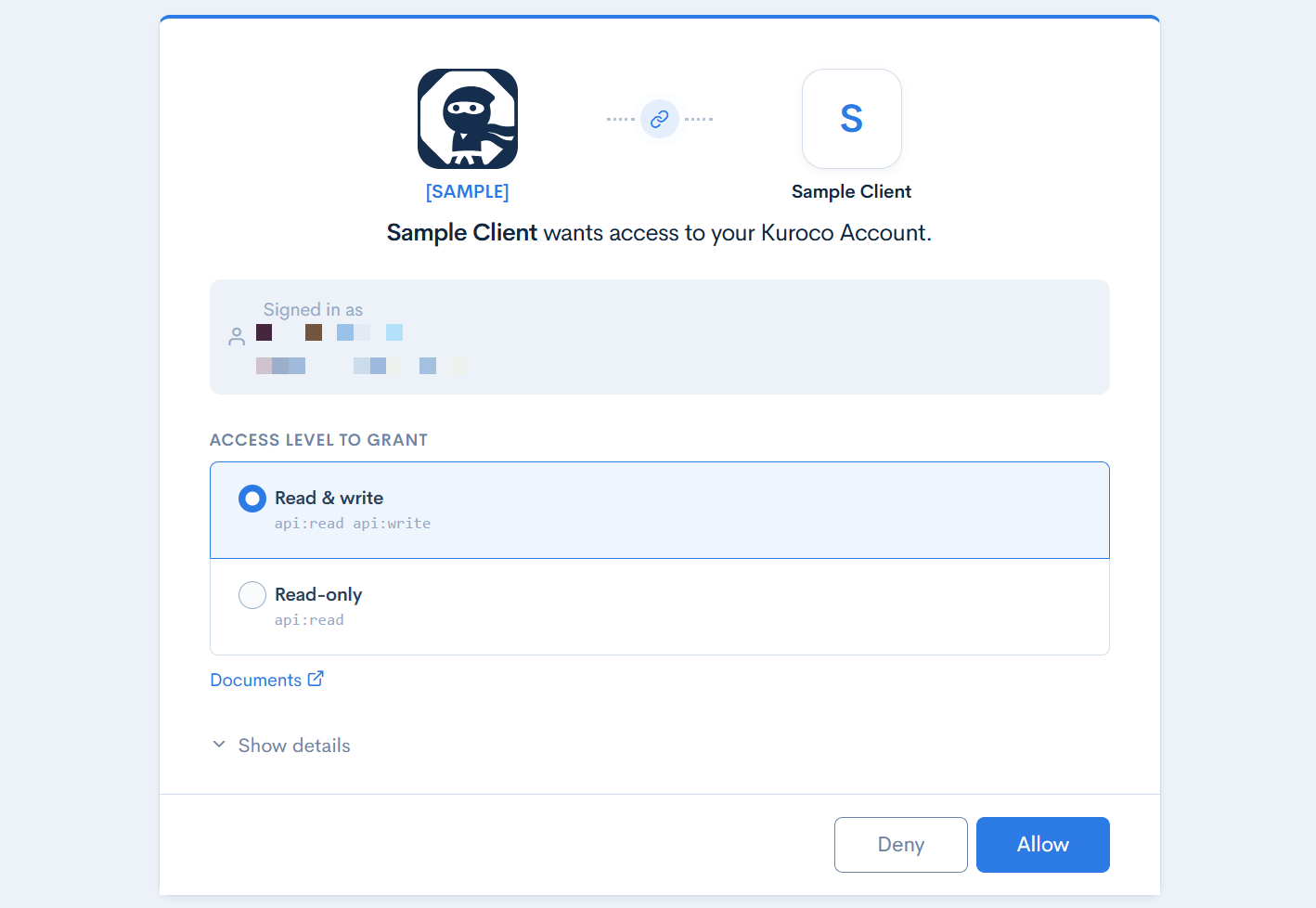
On an authorization server with target domain API, when the connecting application requests both api:read (Read API data) and api:write (Write API data), the consent screen shows an [Access level to grant] selection. The member can approve the request as is, or narrow it to read-only.
| Access level | Scopes of the issued token | Description |
|---|---|---|
| Read & write | api:read + api:write | Preselected. The token is issued with the scopes the application requested. |
| Read-only | api:read | The token is issued with api:write removed from the requested scopes. Only read requests are accepted with this token; write requests are rejected. |
When the requested scopes are read-only or write-only, no selection is shown and the consent screen is the same as before.
The admin panel settings are unchanged. The authorization server's [Allowed Scopes] and the client's scope settings work as before, and the consent screen never offers a scope they do not allow.
OAuth Authorization Server Clients
Multiple clients can be registered under one OAuth Authorization Server. A client holds the OAuth Authorization Server client ID, secret, redirect URIs, scopes, and so on.
Accessing the screen
Click [Manage Clients] from the OAuth Authorization Server list screen or the OAuth Authorization Server editor.
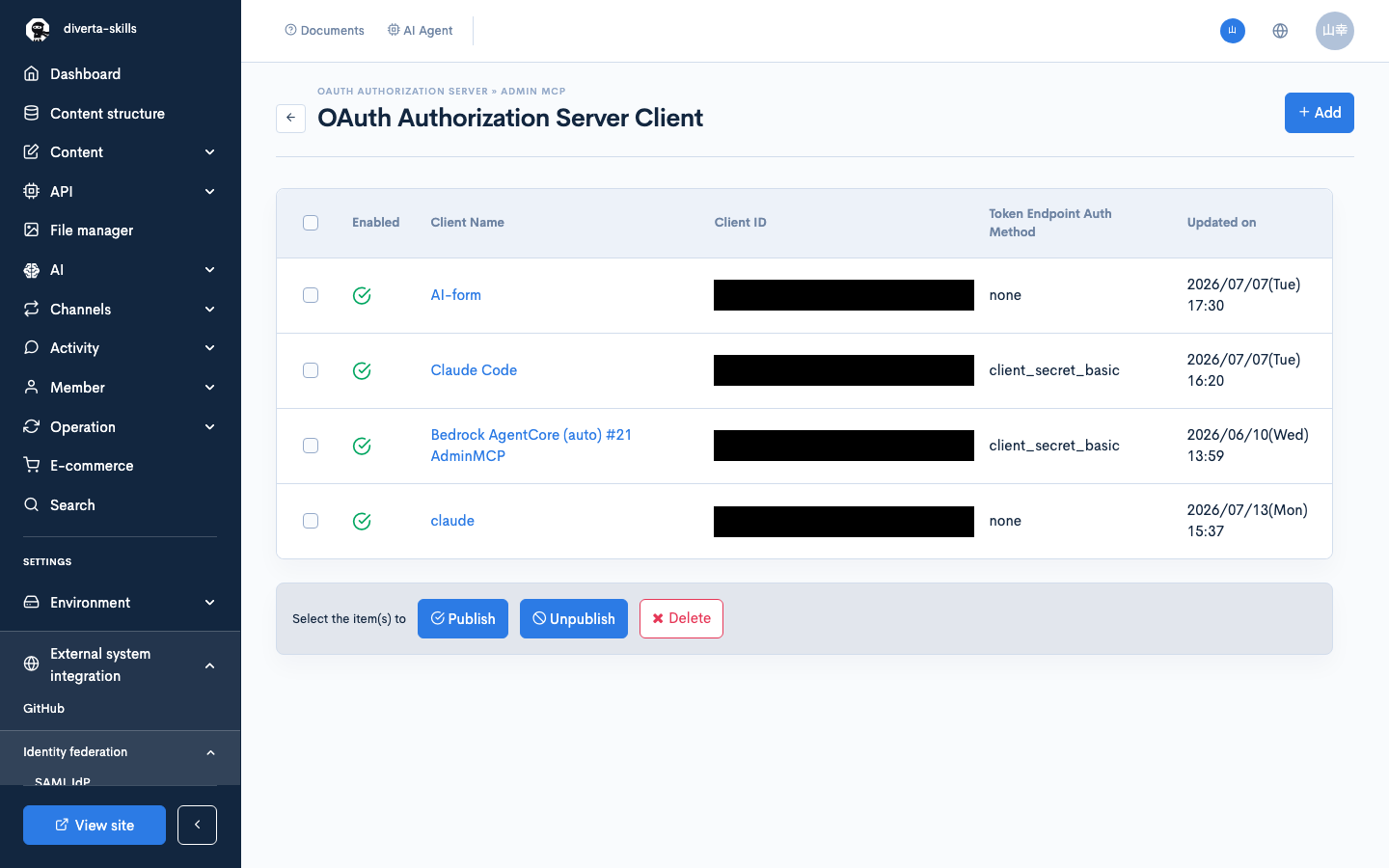
Field descriptions
| Field | Description |
|---|---|
| Enabled | Status of the client.: Enabled: Disabled |
| Client Name | Name of the client. Click it to open the editor. |
| Client ID | The client ID. |
| Token Endpoint Auth Method | The token endpoint authentication method of the client. |
| Updated on | Date and time of the last update. |
OAuth Authorization Server Clients editor
Accessing the screen
Click [Add] at the top right of the client list screen to create a new client. To edit an existing client, click the [Client Name] on the list screen.
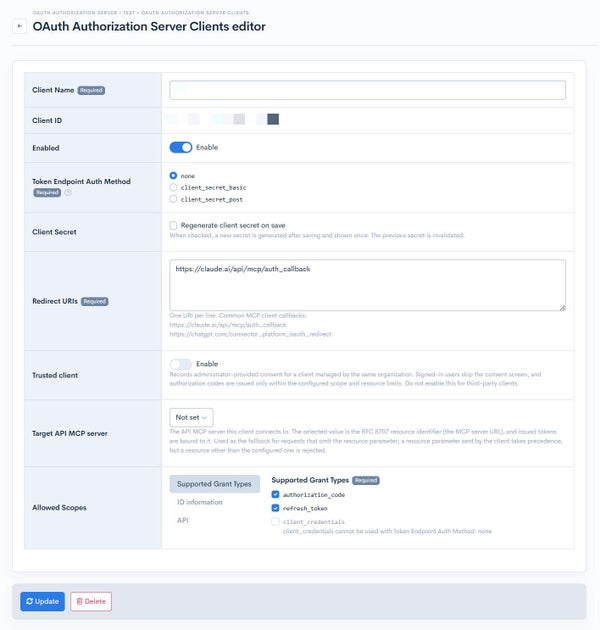
Item descriptions
| Item | Description |
|---|---|
| Client Name | Name of the client. (Required) |
| Client ID | The client ID issued after saving (read-only). |
| Enabled | Check to enable this client. |
| Trusted client | Records administrator-provided consent for a client managed by the same organization. When enabled, signed-in users skip the consent screen and an authorization code is issued. This setting is available only when authorization_code is selected under [Supported Grant Types] for the client.For a public client (Token Endpoint Auth Method none), every redirect URI must be an https URI on a host other than a loopback address. |
| Token Endpoint Auth Method | Authentication method of the client. (Required)none: public client (PKCE only).client_secret_basic: sends the client secret in the Basic authentication header.client_secret_post: sends the client secret in the request body. |
| Client Secret | Check [Regenerate client secret on save] to generate a new secret on save and show it once on screen. The previous secret is invalidated. (Shown only when editing an existing client.) |
| Redirect URIs | Enter one allowed redirect URI per line. (Required) Common MCP client callbacks: https://claude.ai/api/mcp/auth_callbackhttps://chatgpt.com/connector_platform_oauth_redirect |
| Target resource | The Admin MCP endpoint URL this client connects to. (Required when the parent authorization server's target domain is AdminMCP.)It must match the URL configured in the MCP client exactly; otherwise the issued token is rejected on connection. An unbound client could request a token reaching any endpoint in the namespace, including all modules, so token issuance is refused on every grant. |
| Service member ID | Member ID used as the token subject for client_credentials access tokens. The same permission check as token generation is applied on save. (Shown only when the parent authorization server enables client_credentials.) |
| Allowed Scopes | Use the tabs on the left to switch between [Supported Grant Types] and each scope group. Under [Supported Grant Types], check the grant types this client uses (at least one required). Grant types disabled at the parent authorization server are shown as [disabled at authorization server level] and cannot be selected. In each scope group, select the scopes to assign to this client. The selectable scopes are limited to the range allowed by the parent authorization server's [Allowed Scopes]. |
Configuring a trusted client
To use SSO with a first-party service managed by the same organization, configure the client as follows.
- Open the OAuth Authorization Server Clients editor.
- Under [Supported Grant Types] in [Allowed Scopes], select
authorization_code. - Enable [Trusted client].
- Click [Update].
This setting does not store consent separately for each user. It records administrator-provided consent for the client. For authorization request behavior based on prompt, see Authorization requests for SSO.
Enable [Trusted client] only for a first-party client managed by your organization. Do not enable it for a client managed by a third party.
This setting skips only the consent screen. Redirect URI, scope, resource, PKCE, and other validations still apply.
Because the consent screen is skipped, the authorization server identifies the client by the credentials it can verify. A confidential client is identified by its client secret at the token endpoint. A public client is identified only by its registered redirect URI, so a loopback URI (such as http://localhost:3000/callback) or a private-use URI scheme cannot be used — any application on the user's device could receive the authorization code. Register https redirect URIs on a host you control.
When a new client secret is generated on save, the secret is shown at the top of the screen with the following message.
This client secret is shown only once. Copy and store it securely now — it cannot be retrieved later.
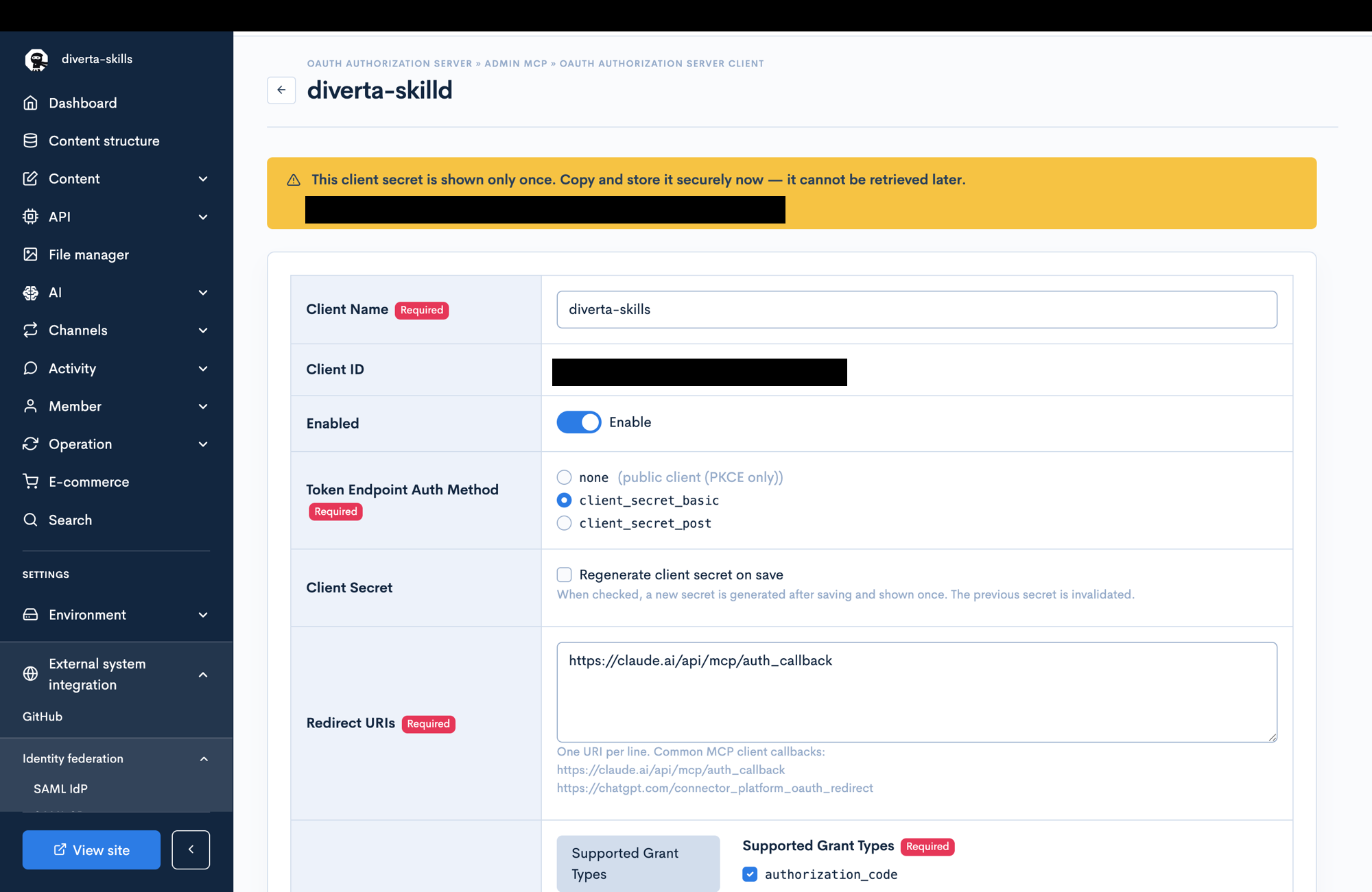
The client secret is shown only once, on save. It cannot be retrieved later, so copy and store it securely when it is shown.
API / MCP clients require at least one access scope. Identity-only scopes (such as openid) cannot reach the API / MCP.
Issued authorizations
You can list and revoke the access / refresh tokens issued by an OAuth Authorization Server. Use this to invalidate the grants of a member who has left or of an integration that is no longer used, without waiting for the tokens to expire.
Accessing the screen
On the OAuth Authorization Server editor, click [List and revoke issued authorizations] in the [Issued authorizations] row.

Field descriptions

Filters
| Item | Description |
|---|---|
| Subject member | Filter by the member_id of the member the token was issued for. |
| Client ID | Filter by a client registered on this authorization server. |
| Audience | Filter by the token's audience. |
| Scope | Filter by the scopes granted in the token. |
| Status | Choose Active / Expired / Revoked / All. Active is selected by default. |
Displayed fields
| Item | Description |
|---|---|
| Status | Active: the token can be used.Inactive (no live token): within the expiry period, but no usable token exists.Expired: the expiry date has passed.Revoked: invalidated by a revoke operation. |
| Subject member | Login ID of the member the token was issued for. Click it to open the member editor. If the grant was authorized via proxy login, the approving member is also shown as [Approver (proxy login)]. |
| Client ID | Client ID of the client the token was issued to. |
| Grant type | Grant type used to issue the token. |
| Audience | Audience of the token. |
| Scope | Scopes granted in the token. |
| Issued at | When the token was issued. |
| Expires at | When the token expires. |
The list shows only an index of the tokens; token values are never stored or displayed.
Revoking authorizations
Revoke authorizations in any of the following ways. The access / refresh tokens of a revoked authorization become unusable immediately.
- Check the authorizations in the list and click [Revoke].
- Filter by [Client ID] and click [Revoke all grants of this client].
- Filter by [Subject member] and click [Revoke all grants of this member].
Revoking requires the delete permission for OAuth Authorization Server.
Client ID Metadata Documents (CIMD)
When [Client ID Metadata Documents (CIMD)] is enabled in the OAuth Authorization Server editor, an application that has not been registered as a client in advance can request authorization by presenting an HTTPS URL as its client_id. Kuroco fetches the client metadata (application name, redirect URIs, scopes, and so on) from that URL and treats it as a temporary client. The fetched content is not stored as a client.
MCP clients that do not register a client per connection target (such as Claude Code) connect this way.
Requirements for connecting via CIMD
| Item | Requirement |
|---|---|
| client_id | An HTTPS URL that includes a path (for example, https://example.com/oauth/client-metadata). Origin-only URLs, paths containing . or .., and Kuroco's own hosts are rejected. |
| Token endpoint auth method | none (public client) only. Metadata declaring a method that uses a client secret is rejected. |
| Grant types | authorization_code and refresh_token only. client_credentials cannot be used. |
| Redirect URIs | At least one is required in the metadata (up to 10, each up to 512 characters). The redirect URI in the authorization request is matched exactly, the same as for a registered client. |
| Scopes | Of the scopes declared in the metadata, only those allowed by [Allowed Scopes] on the authorization server take effect. |
Fetched metadata is cached for 5 minutes to 24 hours according to the Cache-Control of the metadata response (1 hour when not specified). Changes to the metadata are not reflected until the cache expires. If the fetch fails or the requirements above are not met, the authorization request results in an error.
The "Application not registered on this site" notice on the consent screen
The consent screen for an application connecting via CIMD shows an [Application not registered on this site] warning. This does not mean the application is dangerous; it means the following.
- This site's administrator has not registered the application as an OAuth Authorization Server client.
- The application name shown on the consent screen is the self-declared name in the metadata fetched from the client_id URL, and it has not been checked on the site side.
Decide whether to approve based on the [Provider domain], not on the application name.
| Consent screen item | Description |
|---|---|
| Provider domain | The host of the client_id URL. It is the only information that can be verified about the application and is the trust anchor. |
| Client metadata URL (client_id) | The client_id presented by the application (the URL the metadata was fetched from). |
If the domain shown is not one you recognize, click [Deny].
Removing the warning
The warning is not shown once the application connects as a client registered in advance.
- Click [Add] on the OAuth Authorization Server Clients screen and create a client for the application. For a public client (such as Claude Code), select
nonefor [Token endpoint auth method] and enter the application's callback URL in [Redirect URIs]. - A [Client ID] is issued on save.
- Configure the issued client ID in the application and connect (how to configure it depends on the application).
When the connection uses a registered client ID, the registered settings are used and no metadata is fetched from a client_id URL.
To block connections from unregistered applications entirely, disable [Client ID Metadata Documents (CIMD)] in the OAuth Authorization Server editor. While it is disabled, requests presenting a URL as client_id are rejected.
While CIMD is enabled, any application can request authorization without prior registration. A token is issued only when [Approve] is clicked on the consent screen, but the upper bound of the scopes such a token can carry is determined by [Allowed Scopes] on the authorization server. Allow only the scopes you need.
Notes
- The target domain cannot be changed after the authorization server is created. To change the target domain, create a new authorization server.
- Only one authorization server with target domain
Managementand one withAdminMCPcan be enabled site-wide at a time. - The scopes and grant types assignable to a client are capped by the range allowed at the parent authorization server. Scopes and grant types not allowed at the authorization server cannot be selected on the client.
- The client secret is shown only once on save and cannot be retrieved later.
- When [Groups allowed to sign in] is set, only members who belong to at least one of the selected groups can sign in through that authorization server. Leaving it empty means no restriction. It does not apply to service tokens.
- When [Login Page URL] is left empty on an authorization server with target domain
API, the login page served by the authorization server itself is used. See Login page served by the authorization server for details.
Related documents
Support
If you have any other questions, please contact us or check out Our Slack Community.