Member upload
The member upload screen allows you to update member information, add new members, and/or delete existing ones.
Upload
You can batch upload member information in a CSV file using the corresponding member ID as the key. Entries with no member ID will be treated as new registrations.
Note: You can delete a member by setting the corresponding delete flag value to 1. Members with member ID 1 or 2 cannot be deleted.
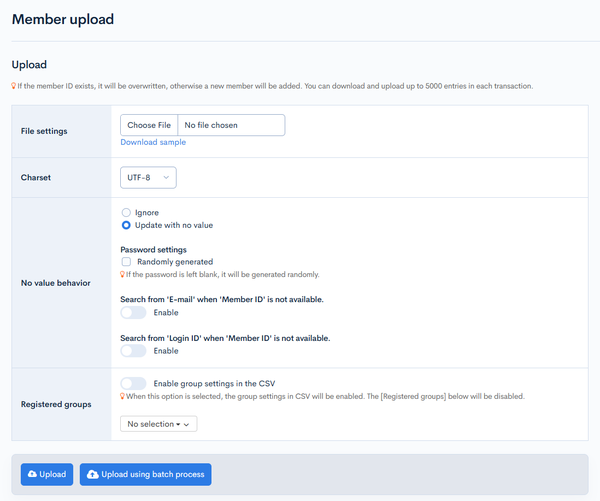
| Field | Description |
|---|---|
| File settings | Select a CSV file from your local drive to upload. |
| Charset | Character encoding of the uploaded CSV file. |
| No value behavior | Configure actions for missing values.
|
| Registered groups | Specify the user group(s) for the uploaded member list. If no options are specified in the CSV or the dropdown list below, new members will be assigned based on the default group settings, and existing members will retain their current group settings. |
Actions
| Button | Description |
|---|---|
| Upload | Update member information using the uploaded CSV file. |
| Upload using batch process | Batch process the upload. Use this option if the uploaded file contains a large number of items. |
Overwriting points (ec_point column)
The ec_point column of the CSV overwrites the member's point balance. When the balance changes, the difference is recorded in the point history (reason = "CSVで更新"). The bulk_upsert API behaves the same way.
| CSV content | Balance | Point history |
|---|---|---|
ec_point column present with a value larger than the current balance | Overwritten | Difference recorded as a grant |
ec_point column present with a value smaller than the current balance | Overwritten | Difference recorded as spending |
ec_point column present with the same value as the current balance | No change | Not recorded |
ec_point column present but empty + empty-update setting ON | Cleared (empty) | The full previous balance recorded as spending |
New member row with ec_point | Set as the initial value | Initial balance recorded as a grant |
No ec_point column | No change at all | Not recorded |
If recording the point history fails for a row after the balance has been overwritten, the error "会員データは更新されましたが、ポイント履歴の記録に失敗しました。" (Member data was updated, but recording the point history failed.) is displayed. In this case, the member data of that row (including the balance overwrite) itself has been updated.
For the point specifications (balance, history, expiration) and API operations, see E-commerce point specifications and point update/history APIs.
Related documents
Support
If you have any other questions, please contact us or check out Our Slack Community.