Can warnings such as "Node.js XX actions are deprecated" during the build be resolved?
You can resolve the warning by updating the versions of the actions specified in your YAML file.
If only a warning is displayed, deployment to KurocoFront is not affected.
Symptom
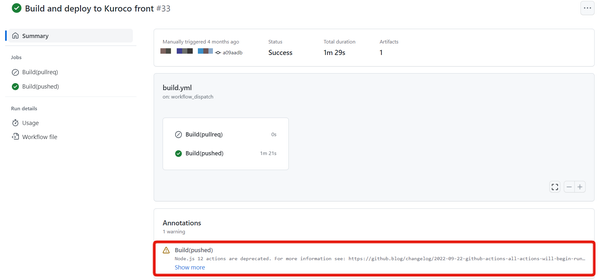
When you run the GitHub Actions workflow that deploys to KurocoFront, a deprecation warning for actions such as Node.js XX actions are deprecated. (where XX is a Node.js version) is displayed.
The following is an example for Node.js 12.
Cause
GitHub Actions actions (such as actions/checkout and actions/setup-node) run on a specific Node.js version for each version of the action.
When GitHub deprecates that Node.js version, workflows that use the corresponding versions of the actions display a warning.
The sample YAML file displayed on [KurocoFront] -> [Github] is updated to versions that do not show the warning. However, depending on when you created your YAML file, it may still contain outdated versions of the actions.
Impact on Deployment
When only a warning is displayed
A warning does not stop the workflow. If the workflow completes successfully, deployment to KurocoFront is performed.
In the KurocoFront sample YAML file, the steps run in the following order.
- Run the build and generate static files
- Upload the generated static files as an artifact (
actions/upload-artifact) - Send a request with a token to Kuroco in the Webhook step
When Kuroco receives the request, it retrieves the uploaded files and deploys them to KurocoFront. As long as the static files are generated and the request with the token is sent to Kuroco, deployment is performed even if a warning is displayed.
When deployment is affected
If any step in the workflow stops with an error (failure), the subsequent steps are not executed. Because the Webhook step is not reached, deployment to KurocoFront is not performed.
If you keep using deprecated actions, the workflow may stop with an error instead of a warning once GitHub ends support for that version.
For example, actions/upload-artifact@v3 was retired on January 30, 2025, and workflows that use it fail (Deprecation notice: v3 of the artifact actions).
Update the versions of the actions as soon as the warning appears.
How to Check
- Open the [Actions] tab of your GitHub repository and select the workflow run that displayed the warning.
- Check whether the job succeeded or stopped with a failure (error).
- Check the action names and versions (e.g.
actions/checkout@v2) listed in the warning or error message. - Open the YAML file under
.github/workflows/in your repository and find where the corresponding actions are specified inuses:.
You can check whether the deployment was performed in "KurocoFront History" under [Channels] -> [WEB] -> [KurocoFront Settings] in the admin panel.
How to Fix
Update the versions of the actions specified in uses: in your YAML file to versions that do not show the warning.
The KurocoFront sample YAML file mainly uses the following actions.
actions/checkout
actions/setup-node
actions/upload-artifact
You can check which version to update to in the latest sample YAML file displayed on [KurocoFront] -> [Github], or in the GitHub repository (Releases) of each action.
The following is an example of updating from @v3 to @v4.
       - name: Checkout Repo
-        uses: actions/checkout@v3
+        uses: actions/checkout@v4
       - name: Use Node.js
-        uses: actions/setup-node@v3
+        uses: actions/setup-node@v4
       - name: Archive Production Artifact
-        uses: actions/upload-artifact@v3
+        uses: actions/upload-artifact@v4
In the KurocoFront sample YAML file, the same actions are specified in both the pull request build and the push build. Update every location in the YAML file where the corresponding actions are specified.
Commit and push the updated YAML file, then confirm that the warning no longer appears in the workflow run.
Updating the major version of an action may change the available parameters or its behavior. Check the release notes of each action before updating, and after updating, confirm that the workflow completes successfully and deploys to KurocoFront.
node-version in actions/setup-node specifies the Node.js version used for your build. It is separate from the Node.js version the action itself runs on, so set it according to the requirements of the framework you use.
Prevention
By using Dependabot, you can keep the actions you use up to date. For the setup procedure, see Is there a way to keep GitHub Actions workflow actions up to date?.
You can also check announcements about action deprecations in the GitHub Changelog - Actions.
Related Documents
Support
If you have any other questions, please contact us or check out Our Slack Community.