How do I upload files from the front end and associate them with content?
If you want to tie a file, such as an image, to some content from the front end, Kuroco requires the following three steps.
- Content definition creation (Add file association to field)
- Endpoint creation
- Front End Creation
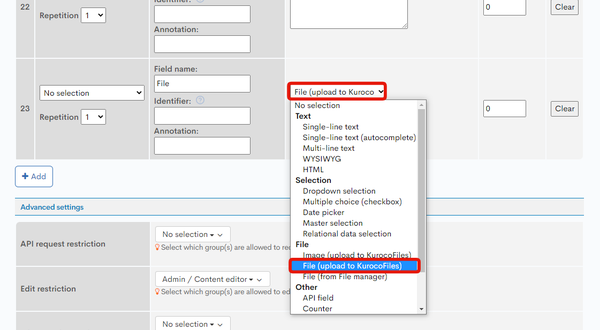
Content definition creation
Create an extended item for the target content and set File(upload to KurocoFiles).
Endpoint Creation
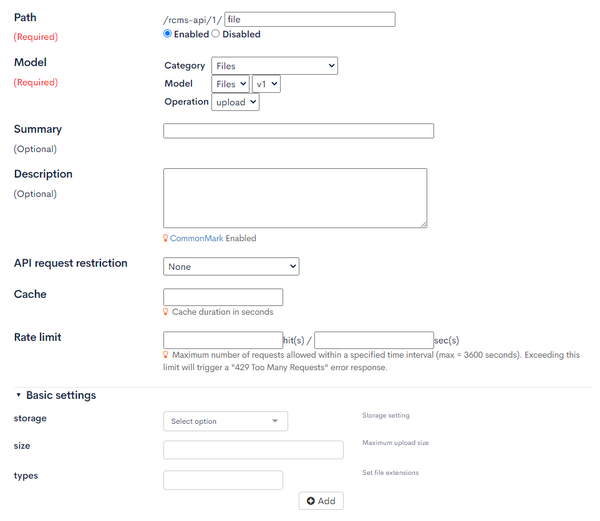
Set the following API endpoints.
- Category:Files
- Model:Files
- Operation:upload
Front End Creation
Send the file to the endpoint for upload and apply the ID responded to to the content update request.
The request header when sending a file must have 'Content-Type': 'multipart/form-data'.
{
    headers: {
        'Content-Type': 'multipart/form-data',
    },
}
For detailed file upload instructions, please refer to Setting up inquiry forms with Kuroco and Nuxt.js -> File upload.
Related Documentation
Support
If you have any other questions, please contact us or check out Our Slack Community.