A vulnerability assessment detected CSRF. How should I address this in Kuroco?
CSRF (Cross-Site Request Forgery) is an attack that takes advantage of the browser automatically attaching credentials to a request. Therefore, the answer depends on the type of security configured for the API.
| Security | How credentials are sent | Is CSRF possible? |
|---|---|---|
| Static Access Token | Specified explicitly in a request header | Not possible |
| Dynamic Access Token | Specified explicitly in a request header | Not possible |
| Privileged Static Token | Specified explicitly in a request header | Not possible |
| Cookie | Attached automatically by the browser | Generally not possible (some endpoints require configuration) |
| None | There are no credentials | Not possible (requires review from a different perspective) |
For the types of security, see API security.
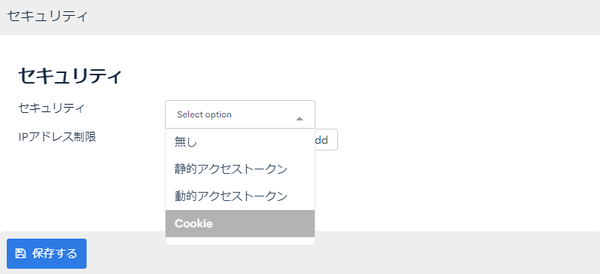
Before you prepare your response to the assessment findings, first check Settings that break CSRF protection. All of the countermeasures described in this article depend on those settings, and they do not work if any of the cases apply.
Token authentication (static, dynamic, or privileged static)
With these security types, the access token is specified explicitly in the X-RCMS-API-ACCESS-TOKEN request header.
Because it is not information that the browser attaches automatically, a request sent from an attacker's site never contains the token.
Therefore, CSRF is structurally not possible. No additional configuration is required.
If you embed a static access token in your frontend, the token is a value that third parties can also obtain. CSRF that impersonates another user is not possible, but review separately the fact that any third party who obtains the token can call the API.
Cookie authentication
With cookie authentication, the browser attaches the cookie automatically. The attributes of the cookies that Kuroco issues are as follows.
| Attribute | Value |
|---|---|
| SameSite | API: None / admin panel: Strict |
| Partitioned | Attached when Using Partitioned with Cookies is enabled (enabled by default) |
| HttpOnly | Attached |
| Secure | Attached |
You can check the Partitioned attribute setting in [Environment] -> [Admin panel] -> [Admin panel] under [Using Partitioned with Cookies].
Because the API cookie is SameSite=None, the cookie is sent even for cross-site requests.
However, a Kuroco API endpoint defines in advance the Content-Types that it accepts, and rejects requests with any other Content-Type with 400.
The Content-Types that an HTML form can send are limited to application/x-www-form-urlencoded, multipart/form-data, and text/plain. Therefore, on an endpoint that accepts only application/json, a request sent from a form on an attacker's site is rejected before it is processed.
text/plain is always rejected, because there is no setting to accept it as an endpoint Content-Type.
Requests without a Content-Type header are also rejected.
Only the logout endpoint accepts requests without a Content-Type header. Logout destroys the session and does not update data or retrieve information while impersonating another user, so its impact as CSRF is limited.
These rejections do not apply in the cases listed in Settings that break CSRF protection.
A vulnerability assessment may flag the fact that the SameSite attribute of the cookie is not Strict. For our position on this finding, see My site was diagnosed with a security vulnerability. What should I do?.
Default behavior
Among POST requests to a cookie-authenticated API, requests that do not meet the conditions described below are not rejected by default; they are only recorded in the detection log.
This is so that you can inventory the affected requests from the logs before enabling CSRF protection.
Detected requests are recorded in the App log. Enter CsrfGuard in [Keyword] to filter them.
The detection log uses the same conditions as when [Enforce CSRF protection for cookie-authenticated APIs] is enabled. The Origin header condition described below is also part of the check, so you can confirm from the log that no client omits the Origin header before enabling the setting.
To actually reject the requests, enable the following setting.
Enabling CSRF protection for cookie authentication
Click [Environment] -> [Site settings], check [Enforce CSRF protection for cookie-authenticated APIs] under [Common], and save. This setting applies per site. It cannot be configured per API, so enabling it applies to every cookie-authenticated API in the site.
For details about the settings screen, see Site settings.
Once enabled, a POST request to a cookie-authenticated API must meet both of the following conditions, and requests that do not are rejected with 403.
| Condition | Description |
|---|---|
The Origin header is an allowed origin | The request has an Origin header whose value matches one of: the https origin of the host the request reached, an origin matching CORS_ALLOW_ORIGINS of the API, or the management URL. |
The request has Content-Type: application/json or X-Requested-With: XMLHttpRequest | A Content-Type that an HTML form cannot send, or a request header that an HTML form cannot attach. |
Origin is a request header set by the browser and cannot be forged by JavaScript within a page.
This makes it possible to distinguish a request sent from a page on your own site from one sent from an attacker's site.
Because browsers always attach an Origin header to POST requests, a request without an Origin header is treated as not sent from a browser and is rejected.
The Origin check depends on what is specified in CORS_ALLOW_ORIGINS. If a wildcard (*) is specified, requests from every origin are allowed, so it does not work as CSRF protection. A subdomain wildcard (https://*.example.com) is effective only when every subdomain it covers is under your control.
The following requests are also rejected with 403. Before enabling the setting, check the CsrfGuard detection log in the App log to confirm that no such requests exist.
- A plain
<form>submission from a page on your own site (because it is neitherContent-Type: application/jsonnor sent with theX-Requested-With: XMLHttpRequestheader) - A request from a client that does not send an
Originheader (such as a native app or server-to-server communication)
For configurations that call the API from outside a browser, use token authentication instead of cookie authentication.
The same conditions also apply, according to the [Enforce CSRF protection for cookie-authenticated APIs] setting, to POST requests to the Admin API (/direct/rcms_api/admin_api/). The management URL is the only allowed origin.
Clients such as AI agents that call the Admin API from outside a browser with a management login session must set the Origin header to the management URL and also send Content-Type: application/json themselves. The Admin MCP server uses token authentication only and is out of scope.
Only POST requests to a cookie-authenticated API are checked. GET is out of scope.
Requests that Kuroco issues to itself, such as bulk, async execution, and Smarty api_internal, are also out of scope.
None of the standard Kuroco GET operations update data.
However, on endpoints where the processing is defined by the user, such as Api::request_api (Execute custom function via API (GET method)), an update may occur depending on that processing. GET is out of scope for CSRF protection, and rejection by Content-Type does not apply either.
Configure processing that involves updates on a POST endpoint, such as Api::request_api_post (Execute custom function via API (POST method)). The same applies when the proxy destination of Api::proxy or Api::aggregate has side effects.
Correct CORS settings are a prerequisite
CORS alone is not a CSRF countermeasure, but all of the countermeasures described in this article assume that the CORS settings are correct.
CORS is a mechanism that prevents the browser from reading the response; it does not prevent the request itself from reaching the server. Requests that do not trigger a preflight request (such as a submission from an HTML form) reach the server even from origins that are not allowed by CORS.
On the other hand, requests that trigger a preflight request also reach the server when they come from an origin allowed by CORS.
CSRF rejection by Content-Type: application/json works because the attacker's origin is not allowed by CORS and that preflight request therefore fails.
If you specify a wildcard (*) in CORS_ALLOW_ORIGINS, Kuroco returns the origin of the request as-is in Access-Control-Allow-Origin.
When CORS_ALLOW_CREDENTIALS is also enabled, every origin is allowed to send requests with Content-Type: application/json and to read the responses. Because the boundary between origins is gone, neither rejection by Content-Type nor [Enforce CSRF protection for cookie-authenticated APIs] works.
Specify the origins you want to allow explicitly in CORS_ALLOW_ORIGINS.
Whether the cookie is attached to the request also depends on the Partitioned attribute. For the result of each combination, see Conditions under which CSRF is possible.
When CORS_ALLOW_ORIGINS is specified explicitly, the CORS settings have the following three roles.
| Role | Description |
|---|---|
| Protecting the response | Pages on origins that are not allowed cannot read the content of the response. |
| Rejecting the preflight | Requests that trigger a preflight request fail when they come from origins that are not allowed. |
| Checking CSRF protection | Used for the check when [Enforce CSRF protection for cookie-authenticated APIs] is enabled. |
Differences with the Partitioned attribute
The Partitioned attribute of a cookie partitions the cookie by top-level site. When Using Partitioned with Cookies is enabled, the cookie is not attached to requests sent with JavaScript from a page on an attacker's site.
On the other hand, the cookie is attached to a request submitted from a form on an attacker's site with a page transition, because the top-level site of the destination matches. In other words, when the Partitioned attribute is enabled, an attacker can only send the Content-Types that an HTML form can send.
Conditions under which CSRF is possible
The following summarizes the conditions described so far for an endpoint that accepts only application/json.
| Partitioned attribute | CORS_ALLOW_ORIGINS | Is CSRF possible? |
|---|---|---|
| Enabled | Specified explicitly | Not possible |
| Enabled | Wildcard (*) | Not possible (the cookie is not attached) |
| Disabled | Specified explicitly | Not possible (rejected with 400) |
| Disabled | Wildcard (*) | Possible |
When a wildcard (*) is specified, a request with Content-Type: application/json sent from an attacker's site also meets the conditions of [Enforce CSRF protection for cookie-authenticated APIs], so it is not rejected even if you enable the setting.
When the Partitioned attribute is enabled, CSRF is not possible because the cookie is not attached, but your CSRF countermeasure then depends solely on cookie partitioning by the browser. Do not specify a wildcard (*).
Other settings that affect these conditions are summarized in Settings that break CSRF protection.
Endpoints that receive form-format requests
The Content-Types that an endpoint accepts are specified in the [API] settings.
An endpoint that explicitly specifies multipart/form-data or application/x-www-form-urlencoded accepts a Content-Type that an HTML form can send, so rejection by Content-Type does not apply.
If you publish such an endpoint with cookie authentication, enable [Enforce CSRF protection for cookie-authenticated APIs].
In addition, because legitimate requests do not meet the Content-Type: application/json condition either, attach the X-Requested-With: XMLHttpRequest header in your frontend implementation.
Because X-Requested-With is a request header that an HTML form cannot attach, a preflight request occurs when it is sent from a page on another origin.
Register the origin of the sender in CORS_ALLOW_ORIGINS before you attach the header. Otherwise, legitimate requests will fail.
The X-Requested-With: XMLHttpRequest header is required even when the request is sent from a page on the same origin. A plain <form> submission is rejected. For details, see Enabling CSRF protection for cookie authentication.
Security set to None
Because no credentials are used, CSRF that impersonates another user is not possible. However, if you publish an endpoint that updates data without authentication, anyone can call it regardless of CSRF. Configure appropriate security in API security.
Checking the CORS settings
In the sidebar, click the [API] whose settings you want to check, and then click [CORS].
Specify the origins you want to allow explicitly in CORS_ALLOW_ORIGINS. Do not specify a wildcard (*).
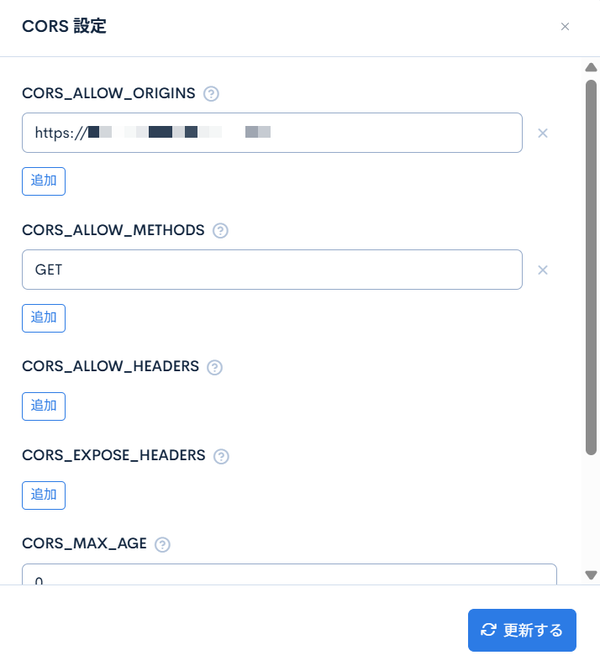
https://example.com
Use a wildcard (*) only to verify behavior during development, and also remove development origins such as http://localhost:8080 from the production settings.
For details about the setting items, see API.
Settings that break CSRF protection
All of the countermeasures described so far depend on the following settings.
A cookie-authenticated login session is shared among the cookie-authenticated APIs in a site, even when the api_id differs. The CORS settings, the security, and the accepted Content-Types, on the other hand, are configured per API.
Therefore, check the following items not only for the API covered by the assessment but for every cookie-authenticated API in the site. You can check the CORS settings as described in Checking the CORS settings.
| Setting | Impact | Action |
|---|---|---|
A wildcard (*) is specified in CORS_ALLOW_ORIGINS | An attacker's site can send requests with Content-Type: application/json. Neither rejection by Content-Type nor [Enforce CSRF protection for cookie-authenticated APIs] works, and the content of the response can also be read. | Specify the origins you want to allow explicitly. |
A development origin (such as http://localhost:8080) remains in CORS_ALLOW_ORIGINS | Requests from that origin are allowed. | Remove it from the production settings. |
A subdomain wildcard (https://*.example.com) is specified in CORS_ALLOW_ORIGINS, and you cannot confirm that every subdomain it covers is under your control | If a subdomain outside your control becomes available to an attacker, it meets the Origin condition. This includes subdomains assigned to external services and subdomains you no longer use that a third party could take over. | Specify the origins under your control as an exact match. |
An endpoint that accepts multipart/form-data or application/x-www-form-urlencoded is published with cookie authentication (see Endpoints that receive form-format requests) | Rejection by Content-Type does not apply. | Enable Enforce CSRF protection for cookie-authenticated APIs. |
A cookie-authenticated API is called from a client that does not send an Origin header, such as a native app or server-to-server communication | These requests are rejected with 403 when [Enforce CSRF protection for cookie-authenticated APIs] is enabled. | Switch to token authentication. |
| A GET endpoint performs updates in its custom function | GET is out of scope for the CSRF protection check, and rejection by Content-Type does not apply either. | Configure processing that involves updates on a POST endpoint. |
| [Using Partitioned with Cookies] is disabled | The cookie is also attached to requests sent with JavaScript from a page on an attacker's site. | Enable it. |
Sample explanations for assessment findings
Use the sample explanations below after confirming that none of the cases in Settings that break CSRF protection apply.
When using token authentication
This system uses Kuroco, an API-based headless CMS, and the target API is authenticated with an access token. The access token must be specified explicitly in a request header and is not information that the browser attaches automatically. Therefore, CSRF, which presumes that credentials are sent automatically, is not possible.
When using cookie authentication
For an endpoint that accepts only application/json, you can explain it as follows.
This system uses Kuroco, an API-based headless CMS. The endpoints of the target API accept only requests with
Content-Type: application/json, and any other Content-Type is rejected with 400 before the request is processed.application/jsonis not among the Content-Types that an HTML form can send, so a request sent from a form on an attacker's site is not processed.
For an endpoint that accepts multipart/form-data or application/x-www-form-urlencoded, enable [Enforce CSRF protection for cookie-authenticated APIs] and then explain it as follows.
This system uses Kuroco, an API-based headless CMS, and CSRF protection is enabled for POST requests to cookie-authenticated APIs. A POST request must meet both of the following conditions: its
Originheader is the site's own origin or an origin allowed in the CORS settings, and it hasContent-Type: application/jsonor theX-Requested-With: XMLHttpRequestheader. Requests that do not meet both conditions are rejected with 403.Originis a request header set by the browser and cannot be forged from an attacker's page. In addition,application/jsonis not among the Content-Types that an HTML form can send, and an HTML form cannot attach an arbitrary request header such asX-Requested-With. Therefore, CSRF by requests from an attacker's site is not possible.
Related documents
Support
If you have any other questions, please contact us or check out Our Slack Community.