Is there a feature that automatically suspends usage when costs exceed a certain amount?
There is no feature that automatically suspends usage when a specified amount is exceeded.
As a way to notice increasing costs, Kuroco provides the "Monthly cost monitoring alert threshold". When you set an amount, you will receive an e-mail notification when your monthly expenses exceed that number. APIs and batch processing continue to run after the notification is sent.
Setting the monthly cost monitoring alert threshold
- In the left sidebar menu, click [Environment] -> [Account].
- In [Monthly cost monitoring alert threshold], enter the amount (in JPY) at which you want to be notified. Entering
0disables the notification. - Click [Update].
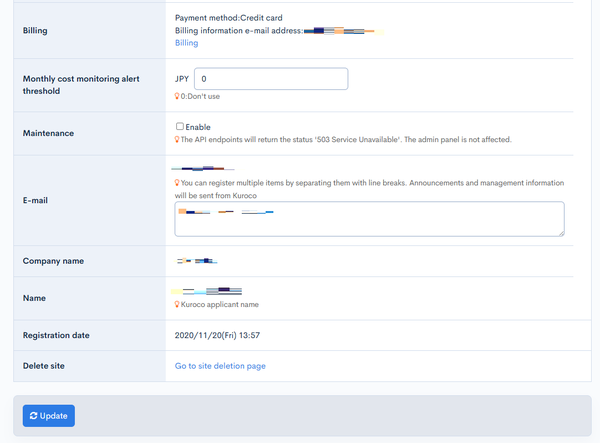
The configured amount is also displayed in [Monthly cost monitoring alert threshold] on [Environment] -> [Billing]. Clicking [Settings] there takes you to Account settings.
Notification recipients
The alert is sent to the e-mail addresses registered in the following three places.
- The Kuroco applicant's e-mail address shown in [E-mail] on [Account settings] (it cannot be changed from the admin panel)
- The e-mail addresses registered in the input field of [E-mail] on [Account settings] (multiple addresses can be registered, separated by line breaks)
- [Billing information e-mail address] under [E-mail notification] on [Billing]
The handling of usage that exceeds the free limit is a separate specification from the alert above. Kuroco usage fees are checked daily, and if usage exceeds the free limit, maintenance mode is turned on automatically. By registering your credit card, you can unlock the maintenance mode caused by exceeding the free limit. For details, see Billing.
To reduce the costs themselves, also see Optimization of Kuroco Usage Fees.
If you want to stop operation intentionally, you can manually enable [Maintenance] in Account settings. In that case, API endpoints return 503 Service Unavailable and batch processing also stops.
Related documents
Support
If you have any other questions, please contact us or check out Our Slack Community.