Can I use spaces in tag names?
Spaces cannot be included in tag names. Spaces in tags are treated as delimiters, so their use is intentionally restricted.
If you want to show a label that contains spaces on the frontend, please use the tag's extension columns (Columns 1-10). In addition to the title, each tag has extension columns numbered 1-10 that can be retrieved via API.
How to use
- In Kuroco, register the tag title without spaces, following the standard format.
- On the tag editor screen, register the formal name that contains spaces in one of the extension columns (Columns 1-10).
- On the frontend, reference the extension column value for display instead of the tag name.
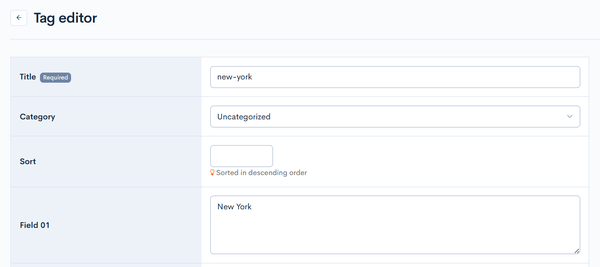
Registration example
| Field | Value |
|---|---|
| Title (tag name) | new-york |
| Column 1 (display name) | New York |
API response example
The tag's extension columns are returned as ext_col_01 through ext_col_10 in the API response. On the frontend, reference the extension column value for display instead of tag_nm.
{
  "tags": [
    {
      "tag_id": 1,
      "tag_nm": "new-york",
      "ext_col_01": "New York"
    }
  ]
}
Related documentation
Support
If you have any other questions, please contact us or check out Our Slack Community.